

You rely on a compact, reliable setup to stay productive whether you work from a home office, a coworking space, or while traveling. The Impulse Panda 8-in-1 USB-C Docking Station aims to deliver versatile connectivity in an ultra-slim package so you can stream 4K video, charge your laptop, transfer large files, and connect multiple peripherals at once.
Understanding what this hub can and cannot do helps you decide if it will simplify your workflow, reduce cable clutter, and extend the life of your laptop by filling in missing ports.
8-in-1 USB-C Docking Station
8-in-1 USB-C Docking Station
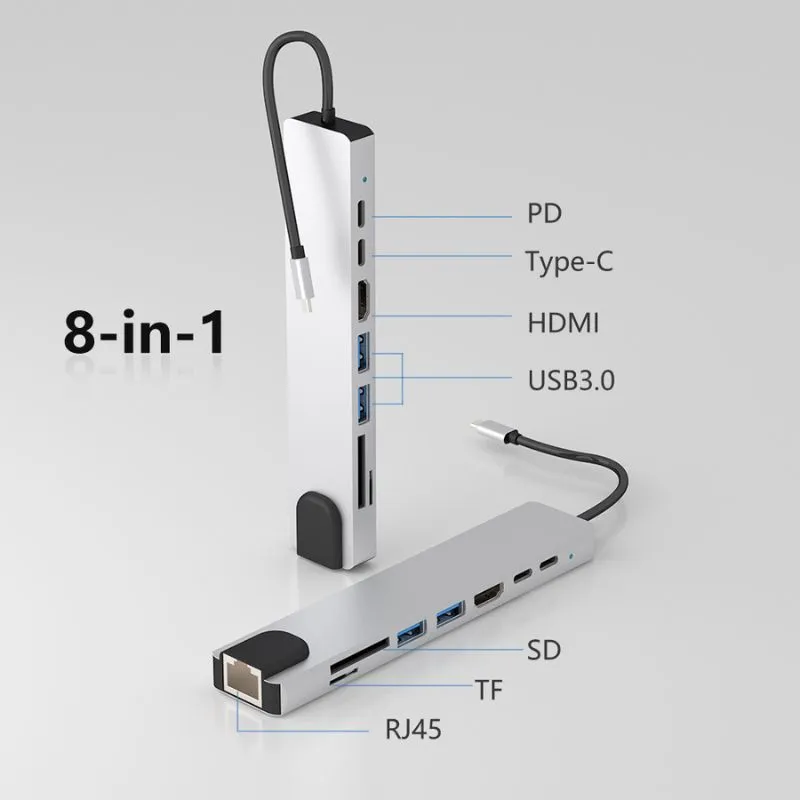
8-in-1 USB-C Docking Station – Ultra-Slim Hub for MacBook & Windows
You get a slim, no-nonsense hub that turns a single USB-C port into a small command center. Plug it into your MacBook or Windows laptop and you can run an external 4K monitor, charge your machine, move files over USB, and hook up Ethernet and SD cards without swapping cables. For daily use it keeps your workspace tidy and lets you dock quickly when you sit down to work.
5 in stock
On travel days it slips into your bag and gives you full desktop perks in a hotel or coworking space. It’s not flashy, but if you value convenience and fewer cable headaches, it’s an easy product to recommend.
Use Cases
| Situation | How It Helps |
|---|---|
| Remote Work | You can connect an external monitor, keyboard, mouse and wired internet quickly, creating a stable workstation without juggling adapters. |
| Client Presentations | Plug into a projector or HDMI-equipped screen and mirror or extend your display in seconds, avoiding last-minute adapter hunts. |
| Business Travel | The slim form factor slips into your bag so you can turn a hotel desk into a full setup with just one cable. |
| Photo and Video Offloads | SD and microSD slots make it quicker to transfer media from cameras or phones when you’re editing on the go. |
Ease of Use
| Feature | Ease Level |
|---|---|
| Plug-and-Play | Easy |
| Driver Installation | Easy |
| Switching Displays | Moderate |
| Cable Management | Easy |
Versatility
The hub covers a wide set of everyday needs—video output, charging, wired networking, file transfer and legacy USB accessories—so it fits many workflows from office desks to travel setups.
Compatibility
| Platform | Compatibility Level |
|---|---|
| MacBook (USB-C) | High |
| Windows Laptops (USB-C) | High |
| Tablets with USB-C | Moderate |
| Smartphones with USB-C | Limited |
Durability
The hub feels lightweight and is primarily plastic, so it’s fine for daily desk use and travel but you’ll want to avoid rough handling. Treat it as a portable accessory rather than a heavy-duty tool.
Practicality
You get straightforward practicality: fewer adapters to carry, quick desk setup, and most ports you actually use. It won’t replace a full docking station for power users, but for everyday productivity it’s a handy addition.
Key Benefits
- Consolidates multiple ports into one compact hub so you can connect everything at once
- Supports 4K video output for clearer external displays
- Includes power passthrough so your laptop can charge while using peripherals
- Portable, lightweight design that fits in a laptop bag
Is the 8‑In‑1 USB‑C Docking Station Compatible With My Laptop And Monitors?
You should verify that your laptop’s USB‑C port supports DisplayPort Alt Mode and Power Delivery because the dock relies on those standards for video output and charging. The hub is designed to be plug‑and‑play with most MacBook and Windows laptops and many tablets, but some older or budget machines only expose data over USB‑C and will not drive external displays.
If you need multiple independent high‑resolution monitors or Thunderbolt‑class performance, check your laptop’s GPU and port capabilities since the dock shares the host bandwidth and may not duplicate full Thunderbolt features. For a quick check, consult your laptop’s specifications or the manufacturer’s support page to confirm video and PD support.
Can The Dock Charge My Laptop And Run 4K Displays At The Same Time?
You can charge your laptop while streaming video and using peripherals, but whether the dock provides full-speed charging depends on your laptop’s PD requirements and the power source you connect to the dock. The unit supports 4K output when your laptop and the connected cable support the required Alt Mode and refresh rate; however, running multiple high-bandwidth tasks can reduce available throughput, so you may see lower refresh rates or limited resolutions if everything is pushed simultaneously. If you rely on maximum charging or sustained heavy workloads, plug your laptop’s original charger into the dock’s PD input or directly into the laptop to maintain optimal power and performance.
How Do You Get The Best Performance And Avoid Connectivity Issues?
You will get the best results by using high-quality, certified USB‑C or HDMI/DisplayPort cables, keeping your laptop’s OS and USB drivers up to date, and connecting a stable external power source to the dock when charging. Remember that all ports on the hub share the host’s bandwidth, so avoid running many high-bandwidth devices at once if you need stable video and fast transfers.
If a port stops responding, try reconnecting the dock, restarting your computer, or testing ports one at a time to isolate the issue; placing the hub on a flat surface with good airflow will also help prevent overheating during extended use.
Wrapping Up
If you need a compact way to add multiple ports, stream 4K video, and charge your laptop while keeping your setup portable, this 8-in-1 USB-C Docking Station is a strong, practical option. You get reliable plug-and-play performance, a useful selection of ports, and a slim design that suits mobile professionals.
It’s especially beneficial if you want to simplify connections between displays, external drives, and peripherals without permanent docks or bulky adapters.
 ImpulsePanda Blog