
Table of Contents
Working remotely is all about maximizing comfort, focus, and productivity wherever you set up. The right technology transforms your workspace into a pro-level command center—and it all begins with a multi-port USB-C docking station that connects, powers, and organizes everything.
Let’s explore the most impactful upgrades for remote work success, and discover why the 8-in-1 Ultra-Slim USB-C Docking Station should be your first step.
Multi-port USB-C Docking Station: The Heart of Connectivity
Remote professionals juggle multiple devices: laptops, external hard drives, monitors, keyboards, webcams, and more. A true multi-port USB-C docking station is the linchpin for seamless workflow:
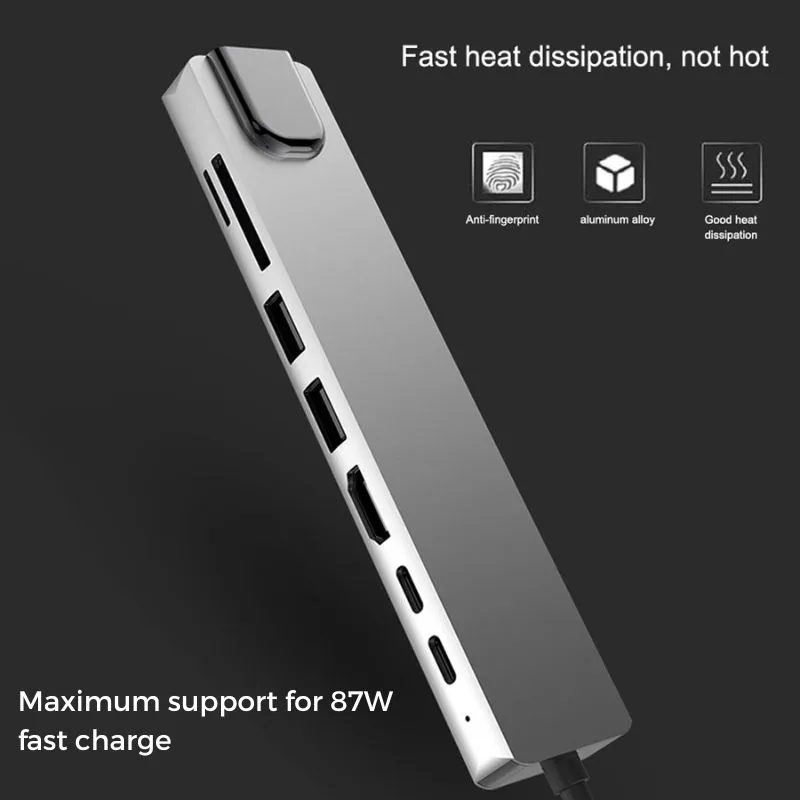
Universal Compatibility: Sync your MacBook Pro, Windows laptops, tablets, and even phones.
Ports for All Needs: Instantly add USB-A, USB-C, SD/MicroSD for file access, HDMI for a high-resolution monitor, and Gigabit Ethernet for rock-solid connections.
Power Delivery: Fast charging keeps your devices powered through the busiest days—no downtime, no interruptions.
High-Speed Data Transfer: Move large files, videos, and project assets with USB 3.0, USB 3.2, and Thunderbolt protocols.
Clutter-free organization: Fewer cables, greater focus, cleaner desk.
Build Quality: Durable aluminum housing, braided nylon, and reinforced stress points withstand daily use.
Dual or Ultra-Wide High-Resolution Monitors
Upgrade to a dual-monitor or wide-angled display for more screen real estate. Use the docking station’s HDMI and DisplayPort Alternate Mode support for easy, lag-free high-definition video connection—perfect for editing, spreadsheets, or virtual meetings.
Ergonomic Accessories
- Wireless keyboard/mouse: Connect comfortably via USB receivers or Bluetooth through the hub.
- Adjustable laptop or monitor stands: Improve posture and reduce strain.
Stable, Wired Internet
Remote meetings and large uploads demand reliability. Plug straight into Gigabit Ethernet via your docking station for a lag-free, high-speed connection—no need to worry about WiFi dead zones.
External Storage & Fast Backup
Transfer data at blazing speeds between your laptop and external hard drives, SSDs, flash drives, or SD cards. The right USB-C docking station makes backups seamless and fast.
Why Start with the 8-in-1 Ultra-Slim Docking Station?
- Instantly transforms any desk or room into a fully equipped office—connect, power, and expand without extra adapters.
- Certified for safety, signal-integrity, and protocol support so all your devices stay protected.
- Easy to carry: slip it in your laptop bag for travel, hot-desking, or co-working space flexibility.
- Supports advanced setups—VR, high-resolution monitors, multi-device charging, and more.
Need more tech tips for your workspace? Read our How to Choose the Right Multi-Port USB-C Hub for Home, Office, and Travel for a detailed guide. Or compare top solutions with our [Best USB-C Docking Stations Compared: What Makes the 8-in-1 Stand Out?] blog.
Ready to supercharge your productivity?
Explore the 8-in-1 Ultra-Slim USB-C Docking Station—the foundation of any pro-level remote workspace.
Conclusion:
Your workspace deserves an upgrade! Start with a multi-port USB-C docking station, and build a home office or mobile setup that energizes, organizes, and empowers you to do your best work—anywhere.
 ImpulsePanda Blog