
Table of Contents
In today’s fast-paced world, USB-C has become the go-to connector for seamless data transfer, reliable charging, and immersive display experiences. Whether you’re a student, professional, gamer, or creative—mastering USB-C can save you time, boost productivity, and open up a world of connectivity.
This guide breaks down how to unlock the full power of USB-C with pro tips for every scenario—and shows how an all-in-one solution like the 8-in-1 Ultra-Slim USB-C Docking Station simplifies it all.
1. Mastering Data Transfer with USB-C
- Blazing Fast Speeds:
USB-C supports advanced data transfer rates—USB 3.0 (5Gbps), USB 3.2 Gen 2 (10Gbps), and up to 40Gbps with Thunderbolt 3, Thunderbolt 4, and USB4 Version 2.0. This means you can transfer huge files, move content from external hard drives, or back up SD/MicroSD cards in seconds. - Universal Serial Bus Compatibility:
Connect everything: laptops, tablets, cameras, and NVMe drives—all with a single port. Forget worrying about USB-A port, USB Type-A/Type-B, or Micro-USB compatibility. - Pro Tip:
Use multi-port docking stations with high-speed ports and alternate modes for best results, and always check your cable and device speed ratings.
2. Powering Up with USB-C Charging
- Power Delivery (PD):
USB Power Delivery enables rapid, efficient charging. The latest USB-C chargers, like the 8-in-1 docking station, offer up to 87W PD or more—enough for laptops, tablets, and even some monitors. - Reliable Charging:
Look for hubs with reinforced stress points, certified AC Adapters, and programmable power supply to prevent overheating and ensure safety. - Multi-Device Charging:
Charge your smartphone, MacBook Pro, wireless earbuds, and more—all at once via a single hub. - Advanced Charging Protocols:
Supports fast charging for Li-Po battery tech, bi-directional charging, and built-in safety features for device longevity.
3. Dynamic Display: Video Output with USB-C
- Alternate Modes:
USB-C supports HDMI Alternate Mode and DisplayPort Alternate Mode—making it easy to connect to high-resolution monitors, VR setups, or projectors. HDMI 2.0+ can deliver crisp 4K@30Hz or higher, perfect for professional, gaming, and entertainment use. - Multiple Monitors:
With a quality docking station, extend your desktop across multiple displays for productivity, gaming, or creative work. - Compatibility:
Compatible with macOS 13 Ventura, Windows, ViewSonic USB-C monitors, and more.
4. How the 8-in-1 Ultra-Slim USB-C Docking Station Excels
- Comprehensive Ports:
2 × USB 3.0, 1 × USB-C data, HDMI, SD/MicroSD slots, Gigabit Ethernet—universal compatibility for any device or accessory. - Durability & Safety:
Aluminum build, braided nylon/double-braided nylon for cable durability, and safety certifications. - High-Speed Everything:
Best-in-class data transfer speeds, reliable charging, stable network access, and seamless display connections.
Troubleshooting & Best Practices
- Signal-Integrity & Safety Certifications:
Ensure your accessories and hub have been validated for signal quality and safety (USB Implementers Forum endorsed). - Desk Organization:
Reduce cable clutter and optimize hub placement for easier access—see our [Organize Your Desk: Cable Management Tips and USB Hub Placement Ideas] for more insights. - Stay Updated:
Use certified cables and update device firmware to maximize compatibility and function.
Want More USB-C Wisdom?
- Compare the best solutions with [Best USB-C Docking Stations Compared: What Makes the 8-in-1 Stand Out?]
- Dive deep into product specs with [USB Hubs vs. Docking Stations vs. USB Adapters: Key Differences Explained]
Ready to unlock powerful data transfer, charging, and display in one?
Get the 8-in-1 Ultra-Slim USB-C Docking Station for a future-proof, all-in-one upgrade to your workspace or home setup!
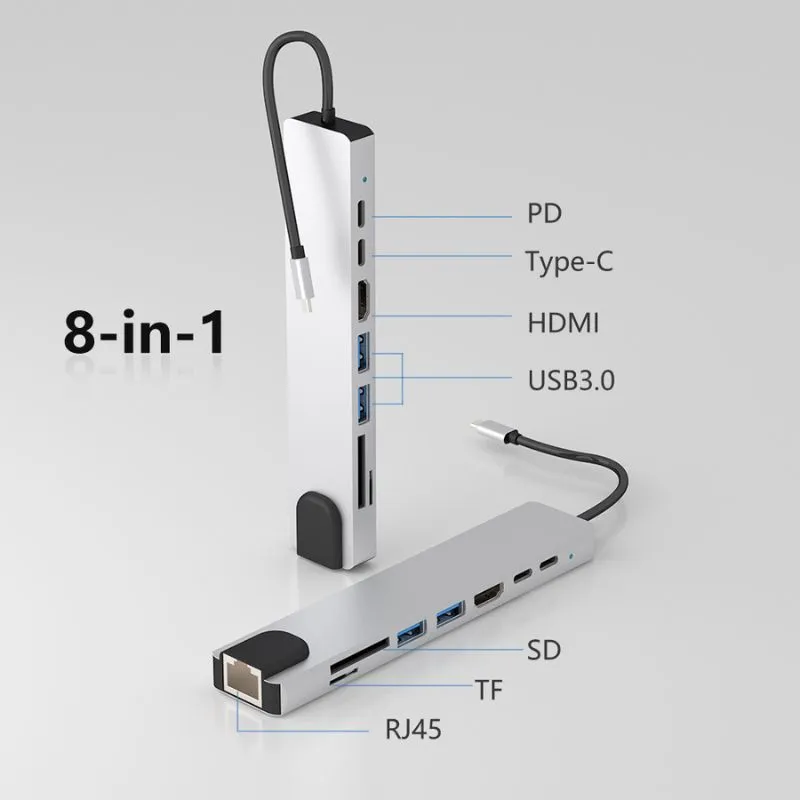
8-in-1 USB-C Docking Station – Ultra-Slim Hub for MacBook & Windows
Transform your workspace in seconds with the ultra-slim 8-in-1 USB-C Docking Station. Whether you’re a creative, student, or business professional, this hub instantly expands your laptop’s connectivity so you can stream in stunning 4K, edit, present, and transfer files with blazing speed. Designed for modern MacBook and Windows user needs, it’s a portable powerhouse that keeps your desk organized and your workflow uninterrupted.
5 in stock
Conclusion:
USB-C is the universal connector for today’s demanding digital lifestyle. With the right hub, every file transfers faster, every device charges smarter, and every display shines. Upgrade your setup—make the most of what USB-C can do!
 ImpulsePanda Blog