
Table of Contents
Are you searching for the perfect multi-port USB-C hub but overwhelmed by all the options? Whether you need reliable charging at home, fast data transfer in the office, or a compact solution for travel, finding the right USB-C hub makes all the difference in productivity, convenience, and device safety.
Here’s an easy, step-by-step guide to choosing the ideal hub—plus why the 8-in-1 Ultra-Slim USB-C Docking Station is the top choice for any scenario.
1. Assess Your Needs: Ports and Power
- Home Office: Do you use external hard drives, printers, or high-resolution monitors? Look for USB-A ports, HDMI, and USB-C Power Delivery.
- Workplace: Need stable wired internet, SD/MicroSD file transfers, or quick peripheral swaps? Opt for hubs with Gigabit Ethernet, multiple USB ports, and advanced data transfer speeds.
- Travel: Compact, lightweight, and durable designs matter most. A single USB-C port that expands to support USB Type-A, Micro USB, USB-C, and SD cards will keep you covered on the go.
2. Check Compatibility
- Choose hubs supporting Universal Compatibility: MacBook Pro, Windows laptops, tablets, and even mobile devices.
- Latest protocol support (USB 3.0, USB 3.2 Gen 2, USB4, Thunderbolt 3/4/5, DisplayPort Alternate Mode) ensures you won’t get left behind with new devices.
3. Prioritize Fast Charging and Data Transfer
- USB Power Delivery keeps your laptop and gadgets charged, even when running multiple USB peripherals.
- For large file transfers, ensure high-speed USB C and USB-A ports (ideally USB 3.0 or faster), and SD/MicroSD slots for quick access to photos, documents, or videos.
4. Look for Build Quality and Safety
- Aluminum alloy bodies with braided nylon or double-braided nylon cables offer maximum cable durability and reinforced stress points.
- Choose hubs with safety certifications, signal-integrity tests, and proven protocol support from trusted sources like the USB Implementers Forum.
5. Consider Extra Features
- Gigabit Ethernet for reliable workplace connectivity.
- HDMI or USB to HDMI Adapter support for connecting VR setups, ViewSonic USB-C monitors, or high-resolution displays.
- Multi-port USB Adapters for more simultaneous connections—key for creative pros, gamers, or remote workers.
6. Portability and Everyday Use
- Pick a hub that fits in your bag or pocket without sacrificing the ports you need. Lightweight, energy-efficient hubs with bi-directional charging and programmable power supply are ideal for frequent travelers.
Why the 8-in-1 Ultra-Slim USB-C Docking Station Excels
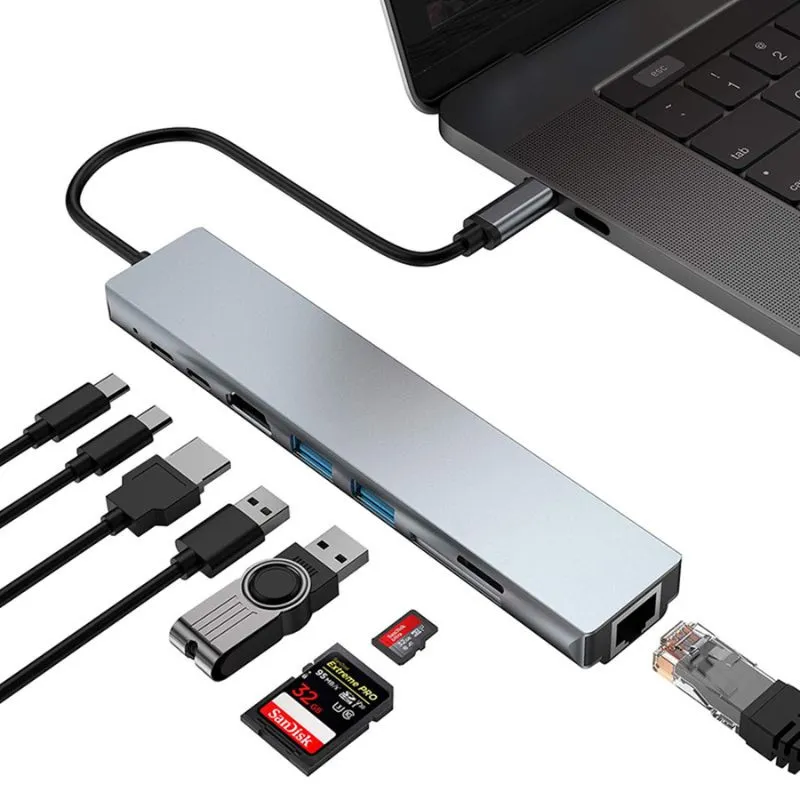
All-in-one: Two USB-A 3.0 ports, USB-C data, SD/MicroSD, Gigabit Ethernet, HDMI (4K support), and 87W Power Delivery.
Universal Serial Bus compliance: Compatible with Mac, Windows, and all major operating systems.
Travel-ready durability: Reinforced stress points, woven nylon, and a slim, lightweight aluminum profile.
Seamless device connectivity for every scenario—workstation, remote office, or airport lounge.
Want an in-depth breakdown of USB hubs and adapters? Explore USB Hubs vs. Docking Stations vs. USB Adapters: Key Differences Explained for technical comparisons.
Boost your connectivity, organization, and productivity—choose the multi-port hub that meets your real-world needs.
Discover the game-changing 8-in-1 Ultra-Slim USB-C Docking Station now!
Conclusion:
Choosing the right USB-C hub is easy—when you know what to look for! For home, office, or travel, trusted solutions like the 8-in-1 Ultra-Slim USB-C Docking Station keep you connected and productive, wherever you go.
 ImpulsePanda Blog