
Table of Contents
If you work with multiple devices or juggle data transfer, charging, and connecting USB peripherals, you’ve probably been confused by all the choices: USB hubs, docking stations, USB adapters. What’s the difference—and which is right for your setup?
Let’s break down each solution, then show why a multi-port docking station like the 8-in-1 Ultra-Slim USB-C Docking Station stands out for versatility and power.
What is a USB Adapter?
- Purpose:
A USB adapter is a small device designed to convert one port type to another. For example, it connects a USB-C cable to a USB-A port or adapts micro-USB/Lightning/USB Type-B connectors as needed. - Best For:
Simple, single-purpose tasks—such as plugging a USB flash drive into a newer laptop with only USB-C ports. - Limitations:
- Only adapts one device at a time
- Usually does not provide power delivery or fast charging
- Limited to basic data transfer speeds and functions
What is a USB Hub?
- Purpose:
A USB hub expands a single USB port (usually USB-A or USB-C) into multiple ports of the same kind. You can now run several USB peripherals—like keyboards, mice, printers, or external hard drives—from one connection. - Best For:
Expanding existing USB ports, especially on desktop PCs and older laptops. - Limitations:
- Usually only supports USB 2.0 or USB 3.0 speeds
- No support for HDMI, Ethernet, advanced charging (Power Delivery), or alternate modes
- Not designed for modern device compatibility (e.g., Thunderbolt, DisplayPort Alternate Mode)
What is a Docking Station?
- Purpose:
A docking station transforms a USB-C or Thunderbolt port into a universal connectivity hub—offering USB-A ports, USB-C, HDMI for monitors, SD/MicroSD for high-speed data transfer, Gigabit Ethernet for wired internet, Power Delivery for charging, even Audio/Mic jacks. - Best For:
Modern laptops, tablets, and work-from-home setups where you need to connect everything: monitors, external drives, USB peripherals, printers, and charge—all at once. - Highlights with the 8-in-1 Docking Station:
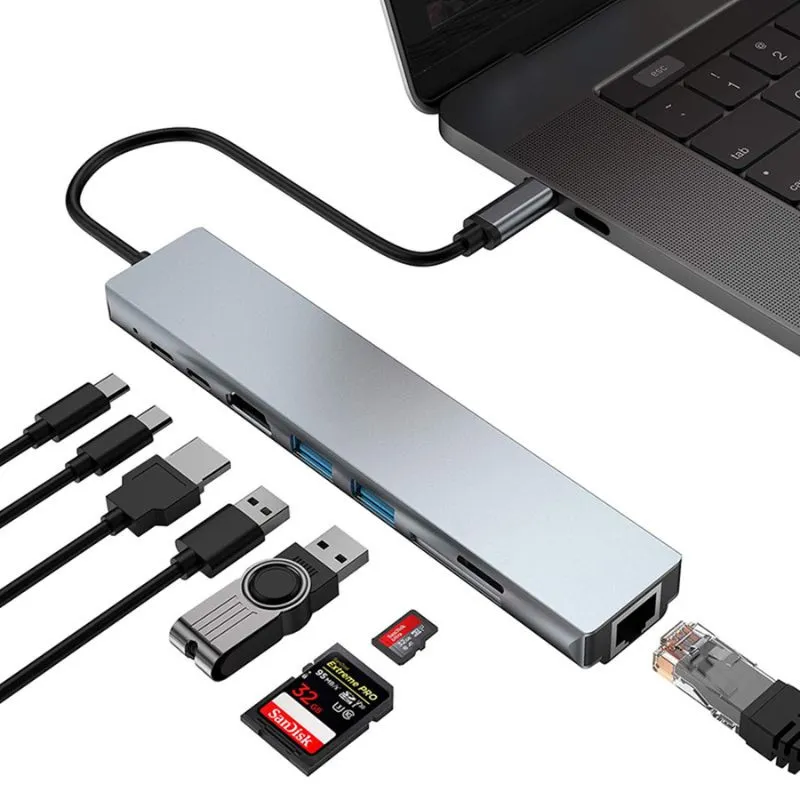
USB 3.0 & USB-C for fast data transfer
Multiple USB-A ports
HDMI with high-resolution monitor support
SD/MicroSD card readers
Gigabit Ethernet for stable, reliable networking
Up to 87W Power Delivery for fast charging your laptop and devices
Aluminum build for durability, portable and space-saving
Supports advanced protocols (Thunderbolt 3/4/5, DisplayPort Alternate Mode, USB Power Delivery, and more)
Which One Should You Choose?
| Feature | USB Adapter | USB Hub | Docking Station (8-in-1) |
|---|---|---|---|
| Purpose | Port conversion only | Increase same port count | Complete workstation connectivity |
| Port Variety | One-to-one | Single port type | USB-A, USB-C, HDMI, SD/MicroSD, Ethernet |
| Power Delivery / Charging | No | Occasionally, basic | Yes, advanced (up to 87W PD) |
| Data Transfer Speeds | Basic | Up to USB 3.0 | USB 3.0, USB 3.2, Thunderbolt, SD/TF |
| Universal Compatibility | Limited | Moderate | Extensive (most devices & OS) |
| Suitable For | Travel, emergencies | Simple desktop expansion | Home office, students, pros, creators |
Why the 8-in-1 Docking Station Wins
Choosing a docking station like the 8-in-1 Ultra-Slim model means you’re not only expanding your connectivity, but you’re investing in future-proof speed, charging, and universal device compatibility. Whether you need to use multiple USB peripherals, enjoy reliable charging speed for your MacBook Pro, or want fast data transfers from your external hard drive, a docking station covers all the scenarios a simple adapter or hub cannot.
Ready to future-proof your setup?
Learn more in our [Best USB-C Docking Stations Compared: What Makes the 8-in-1 Stand Out?] and discover the true power of all-in-one connectivity with the 8-in-1 Ultra-Slim USB-C Docking Station.
Conclusion:
Adapters for a single connection. Hubs for expanding ports. Docking stations for all-in-one, powerful, connected workspaces. Choose smart—choose the docking station that does it all!
 ImpulsePanda Blog